Fire TV Stick 4K Max review & Downloader Guide
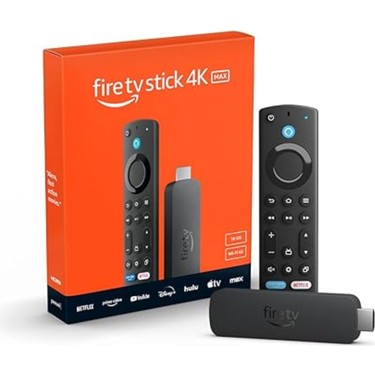
Welcome to our comprehensive hardware guide. If you are searching for an honest Fire TV Stick 4K Max review, you have found the definitive source. The ultimate streaming stick for 2026 is equipped with a powerful 2.0 GHz quad-core processor and Wi-Fi 6E support. Additionally, by utilizing the fire tv stick 4k max downloader setup method, you can effortlessly bypass the official store limitations, allowing you to completely optimize your device for heavy third-party media applications.
fire tv stick 4k max downloader Compatibility Specs
Wi-Fi 6E Support
Experience ultra-smooth, low-latency 4K streaming by connecting to the uncluttered 6GHz network band.
2.0 GHz Quad-Core
Lightning-fast app launches and fluid navigation, making it ideal for running heavy third-party media players.
16GB Storage
Double the storage of previous generations. Plenty of space to sideload multiple streaming apps without errors.
Dolby Vision & Atmos
Bring your home theater to life with cinematic 4K Ultra HD, stunning HDR colors, and immersive audio.
Why the fire tv stick 4k max downloader System Excels
If you are looking to upgrade your home entertainment system in 2026, reading any comprehensive Fire TV Stick 4K Max review will reveal it as one of the most capable and budget-friendly devices on the market. Unlike basic streaming sticks, this model completely revamps the user experience by integrating the robust Fire OS 8 infrastructure, providing unparalleled speed and reliability for cord-cutters.
The Power of the Downloader App
One of the primary reasons tech enthusiasts prefer this hardware is its open ecosystem. While Amazon provides a great official Appstore, many advanced users want to install independent, third-party streaming applications from our Media Players section. This process, known as “sideloading”, is incredibly easy on this device. By utilizing the built-in 16GB of storage and 2GB of RAM, you can comfortably install the Downloader app to manage all your external APKs.
With the fire tv stick 4k max downloader configuration, using the tool is a seamless experience. The 2.0 GHz processor ensures that even the heaviest media players, utility tools, and VPN software run in the background without causing buffering or hardware lag. Here is why it excels:
- No Storage Anxiety: The 16GB capacity means you can download multiple large APK files via the downloader without constantly clearing your cache.
- Network Stability: The Wi-Fi 6E antenna ensures that large file downloads and live 4K streams do not drop, even on congested home networks.
- Developer Options: While FireOS 8 hides the developer options by default, unlocking them takes only 7 clicks, instantly granting you the freedom to install unknown apps.
Ultimately, combining this advanced hardware with the right setup transforms a standard television into a premium, ad-free media hub.
Upgrade Your Setup with Firestick AI
Stop searching forums for the best apps. Our smart AI assistant knows exactly which media players, utility tools, and VPNs work best on the Fire TV Stick 4K Max. Get instant recommendations, troubleshooting help, and safe shortcodes in seconds.
💬 Chat with Firestick AI
Ready to Setup Your Device?
Do you already own this device? We’ve prepared a comprehensive, step-by-step visual guide and a YouTube video tutorial showing you exactly how to install the Downloader app and enable developer options.
▶ Watch Video & Install Downloader